
Technology evolves at a pace that’s almost impossible to track—new coding frameworks emerge overnight, modding tools get smarter, and breakthroughs in graphics processing technology continuously redefine what our devices can handle. If you’re here, you’re likely looking for clear, actionable insights that cut through the noise and help you stay ahead of the curve.
This article is built to do exactly that. We’ll break down the most important digital trends, highlight practical optimization tips, and explore the tools and frameworks that are shaping modern development and performance tuning. Whether you’re a developer, modder, or tech enthusiast, you’ll find focused insights designed to improve efficiency and unlock new possibilities.
Our analysis is grounded in hands-on testing, continuous monitoring of emerging tech ecosystems, and careful evaluation of real-world performance data—so you’re not just reading about trends, you’re learning how to apply them effectively.
The Engines Behind Our Digital Worlds
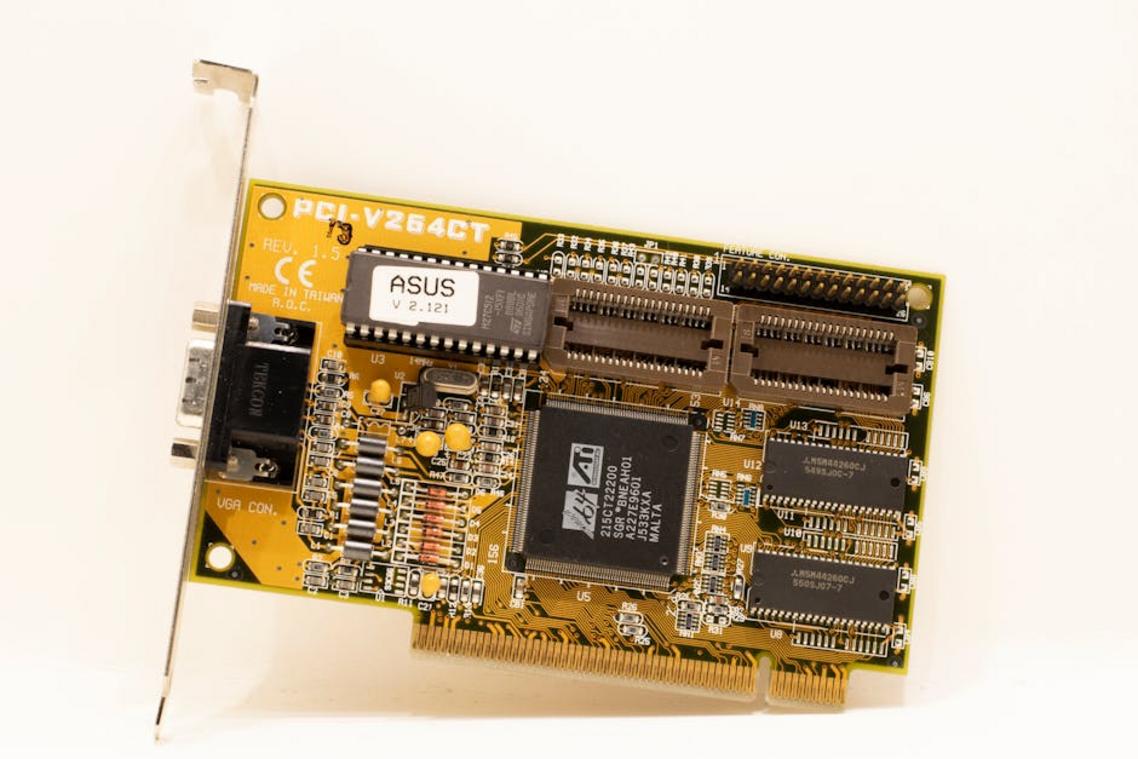
Modern visuals feel like magic, but they’re engineered. At the heart is graphics processing technology, the systems that convert code into lifelike pixels. Think of a GPU (Graphics Processing Unit) as a specialized calculator built for PARALLEL tasks—millions at once.
Some argue CPUs alone are enough. Technically, yes—for output. But when rendering 4K game worlds or Pixar-level lighting, approach COLLAPSES under load.
Key components include:
- APIs that let software talk to hardware
- Shaders that define light, color, and texture
- VRAM storing frame data in time
Understand these, and jargon fades.
Core Components: Understanding GPUs and Graphics APIs
What Is a GPU?
A GPU (Graphics Processing Unit) is a specialized processor built for PARALLEL processing—meaning it can handle thousands of small tasks simultaneously. While a CPU focuses on a few complex tasks at once, a GPU excels at rendering images, video, and animations in real time. In gaming, for example, the GPU calculates lighting, textures, and shadows instantly (yes, even that dramatic explosion in your favorite FPS). This is the backbone of modern graphics processing technology.
Key GPU Architecture Concepts
Not all GPUs are built the same.
- CUDA Cores (NVIDIA): Optimized for NVIDIA’s ecosystem, widely used in AI and creative workloads.
- Stream Processors (AMD): AMD’s equivalent, designed for high parallel throughput and strong price-to-performance ratios.
- VRAM (Video RAM): Dedicated memory for textures and frame data. More VRAM helps with 4K gaming and 3D rendering.
- Clock Speeds: Measured in MHz or GHz, indicating how fast the GPU processes instructions.
Some argue clock speed matters most. Others prioritize core count. In reality, performance depends on workload balance (raw speed without memory bandwidth is like a race car in traffic).
The Role of Graphics APIs
Graphics APIs—such as DirectX, OpenGL, and Vulkan—act as translators between software and hardware. Without them, games couldn’t efficiently communicate with your GPU.
DirectX 12 Ultimate vs. Vulkan
DirectX 12 Ultimate:
- Deep Windows integration
- Advanced ray tracing support
- Optimized for Xbox ecosystems
Vulkan:
- Cross-platform compatibility
- Lower CPU overhead
- Greater developer control
Some developers prefer DirectX for ease. Others choose Vulkan for flexibility. For users, the “better” API often depends on hardware and platform choice.
Key Technologies Driving Realism and Performance
Rasterization vs. Ray Tracing
At the heart of modern graphics processing technology are two rendering methods: rasterization and ray tracing. Rasterization is the traditional technique that converts 3D models into 2D pixels by projecting triangles onto your screen. Think of it like painting a movie set backdrop—fast, efficient, and convincing from the right angle.
Ray tracing, on the other hand, simulates how light physically behaves—tracking rays as they bounce, reflect, and refract. It’s closer to filming with real lighting instead of stage props. The result? Shadows and reflections that look straight out of a Marvel movie.
Critics argue ray tracing is too performance-heavy for most gamers. That was true five years ago. But with hardware acceleration and smart upscaling, it’s quickly becoming mainstream (yes, even on consoles).
Programmable Shaders
Shaders are small programs that run on the GPU. Vertex shaders manipulate a model’s shape and position. Geometry shaders add or modify shapes. Pixel (fragment) shaders determine color, texture, and lighting for each pixel.
In simple terms, shaders are the special effects team. They turn a gray 3D mesh into a rain-soaked cyberpunk alley worthy of Blade Runner 2049. Without them, everything would look like an early 2000s cutscene.
AI-Powered Upscaling
Technologies like NVIDIA’s DLSS, AMD’s FSR, and Intel’s XeSS use artificial intelligence to render frames at lower resolutions, then upscale them intelligently. This boosts frame rates while preserving sharpness.
If you’ve ever wondered how machine learning predicts missing detail, here’s a deeper look at how machine learning algorithms actually work.
Some purists argue upscaling isn’t “true” resolution. Fair—but when DLSS 3 can nearly double performance with minimal visual trade-offs, most players won’t complain (especially mid-boss fight).
Pro tip: Enable DLSS or FSR in demanding titles before lowering texture quality.
Variable Rate Shading (VRS)
Variable Rate Shading (VRS) allocates more rendering power to focal points—like enemies or HUD elements—while reducing detail in peripheral areas. Since your eyes naturally focus on the center, performance improves with little noticeable loss.
It’s optimization that works smarter, not harder—kind of like speed-running a game without skipping the good parts.
Graphics Processing in Action: Application-Specific Breakdowns
For Gaming
When it comes to gaming, performance is measured in milliseconds. Real-time rendering (the process of generating images instantly as you play) must stay fast and fluid. Low latency ensures your actions register immediately, while high frame rates—typically 60 FPS and beyond—keep motion smooth. Technologies like NVIDIA G-Sync and AMD FreeSync synchronize your monitor’s refresh rate with your GPU output, reducing screen tearing and stutter. Meanwhile, NVIDIA Reflex minimizes system latency, giving competitive players a tangible edge (yes, it can mean the difference between clutch or respawn).
However, some argue that raw GPU power alone is enough. In reality, optimization layers matter just as much. Pro tip: Pair a high-refresh monitor with properly tuned in-game settings to avoid CPU bottlenecks.
For Professional Design (CAD/3D Modeling)
By contrast, CAD and 3D modeling demand precision over speed. Here, stability and accuracy in rendering high-polygon-count models take priority. Workstation-class GPUs and specialized drivers, such as NVIDIA Studio Drivers, are optimized for certified software environments. This reduces crashes and visual artifacts—critical when designing architectural blueprints or mechanical assemblies.
Competitors often overlook driver certification, yet it’s a major differentiator in professional workflows. In graphics processing technology, reliability can outweigh sheer benchmark scores.
For Video Editing & VFX
Finally, video editing and VFX rely heavily on encoding/decoding accelerators like NVENC or AMF. These handle compression tasks efficiently, freeing up system resources. Large VRAM capacity supports 4K or even 8K timelines without lag. Software like Adobe Premiere Pro and DaVinci Resolve leverages GPU acceleration to speed up color grading, rendering, and effects processing—turning hours into minutes when configured correctly.
The Next Frontier in Visual Computing
Modern visuals feel less like code and more like cinema, thanks to graphics processing technology evolving at breakneck speed. Think of the leap from Toy Story to Avatar—same medium, wildly different realism. We now rely on AI-driven upscaling, neural shaders, and silicon to blur the line between rendered and real. The next leap will feel invisible, yet transformative. Expect path tracing fused with machine learning, cutting noise while boosting detail (yes, it sounds like sci-fi, but so did The Matrix). • Faster chips paired with algorithms will unlock worlds that respond in realtime.
Stay Ahead of the Curve with Smarter Tech Moves
You came here to better understand how emerging digital trends and graphics processing technology are shaping performance, innovation, and the future of development. Now you have a clearer picture of how these advancements impact your builds, workflows, and optimization strategies.
The real challenge isn’t access to tools — it’s keeping up with constant change. Falling behind on frameworks, modding enhancements, or GPU-driven performance upgrades can cost you speed, efficiency, and competitive edge.
The next step is simple: start applying what you’ve learned. Audit your current setup, integrate smarter optimization techniques, and leverage modern graphics processing technology to unlock better performance right now.
If you’re tired of outdated tools slowing you down, it’s time to level up. Join thousands of developers and tech enthusiasts who rely on cutting‑edge alerts, proven optimization insights, and real‑world modding strategies to stay ahead. Explore the latest updates, implement what works, and future‑proof your projects today.
 Syldric Xevandor, the visionary founder of LCF Mod Geeks, stands at the forefront of modern tech innovation, blending deep technical expertise with a passion for digital evolution. Through his platform, he delivers cutting-edge insights on emerging trends, advanced coding frameworks, modding tools, and performance optimization, empowering a new generation of developers and tech enthusiasts. His mission is simple yet powerful: to make complex technology more accessible, practical, and inspiring for those who want to build, customize, and push the limits of the digital world.