If you’re searching for a clear, practical roadmap to mastering Django, this Django web framework guide is built to give you exactly that. Whether you’re launching your first web app, optimizing an existing project, or exploring scalable backend architectures, you need more than surface-level explanations—you need structured guidance that actually works in real-world development.
This article is designed to walk you through Django’s core components, from project setup and app structure to models, views, templates, and performance optimization. We focus on actionable steps, modern best practices, and common pitfalls developers face when building production-ready applications.
To ensure accuracy and relevance, the insights shared here are grounded in current documentation standards, widely adopted coding frameworks, and proven development workflows used across modern web ecosystems.
By the end, you’ll have a clearer understanding of how Django fits into today’s tech landscape—and how to use it efficiently to build secure, scalable, and maintainable web applications.
Build Robust Web Apps Faster
Building secure, scalable web apps often feels overwhelming. Fortunately, Django changes that. This Django web framework guide shows you how its “batteries-included” philosophy—meaning built-in tools for authentication, admin panels, and security—eliminates repetitive boilerplate. As a result, you ship features faster and with fewer bugs.
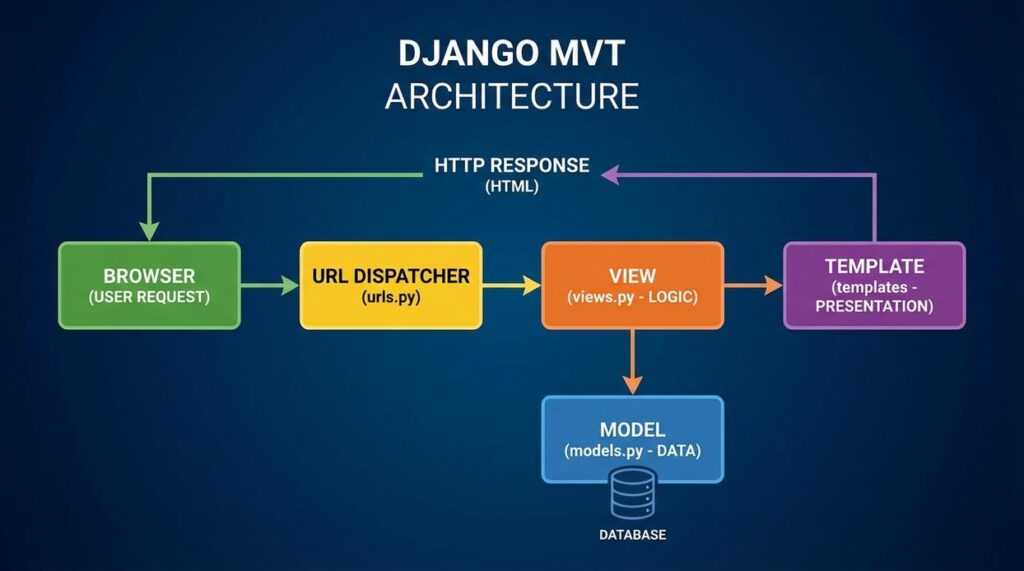
Instead of wiring everything from scratch, you’ll leverage Django’s Model-View-Template architecture, a clean separation of data, logic, and presentation. That structure translates into easier testing and smoother scaling.
By following practical setup steps, you’ll gain a working project quickly—plus the confidence to extend it into production-ready software. Ultimately, you save time and reduce risk early consistently.
Django is a high-level Python web framework built for pragmatism and speed, guided by the Don’t Repeat Yourself (DRY) principle. In plain terms, DRY means writing code once and reusing it, instead of copying and pasting logic everywhere (we’ve all been there).
Back in 2019, when many startups raced to ship MVPs in under three months, Django’s batteries-included philosophy consistently shaved weeks off timelines. Why? Because it ships with core tools ready to go:
- Object-Relational Mapper (ORM): interact with databases using Python instead of raw SQL.
- Automatic Admin Interface: a production-ready dashboard for managing data.
- Built-in Security: defenses against XSS, SQL injection, and CSRF attacks.
- Authentication System: users, groups, and permissions out of the box.
Some developers argue that lighter frameworks offer more flexibility. Fair point. Yet flexibility without structure can slow teams down, especially as projects scale. With Django, conventions reduce guesswork and support long-term growth.
Moreover, its architecture scales from simple blogs to e-commerce platforms and social networks (yes, Instagram famously used it). If you’re exploring a Django web framework guide, reviewing the official docs at https://www.djangoproject.com/ is a smart start. Ultimately, those built-in components free developers to focus on features, not plumbing, making Django versatile and future-ready.
Your First Steps: Setting Up the Django Environment
Before writing a single line of code, make sure you have Python (a programming language that runs your code) and pip (Python’s package manager) installed. Run python --version and pip --version to confirm. If either fails, install the latest stable Python release first.
Next, I strongly recommend using a virtual environment—an isolated workspace that keeps project dependencies separate (so one project doesn’t break another).
Create and activate it:
python -m venv venv- On macOS/Linux:
source venv/bin/activate - On Windows:
venv\Scripts\activate
Now install Django with:
pip install Django
This pulls the latest stable release (always my recommendation unless a project requires otherwise). For a structured walkthrough, consult the Django web framework guide.
Start your project:
django-admin startproject projectnamecd projectnamepython manage.py startapp appname
Key files explained:
- manage.py: Command-line utility for running tasks like migrations and the server.
- settings.py: Central configuration file (databases, apps, security settings).
Finally, confirm everything works:
python manage.py runserver
Visit the local URL shown in your terminal. If you see the welcome page, you’re ready to build (pro tip: keep your virtual environment activated while developing).
Understanding Django’s MVT Architecture

Django’s Model-View-Template (MVT) architecture is the backbone of the framework. Some developers argue it’s just MVC renamed—and they’re not entirely wrong. But Django’s structure is opinionated in ways that improve speed, clarity, and scalability (especially when deadlines loom).
Models (The Data Layer)
A model is a Python class that defines your data structure—think of it as a blueprint for database tables.
from django.db import models

class BlogPost(models.Model):
    title = models.CharField(max_length=200)
    content = models.TextField()
    publication_date = models.DateTimeField()
Each field maps to a database column. After defining a model, you run makemigrations (which generates change files) and migrate (which applies them to the database). Some critics say migrations add complexity. In reality, they provide version control for your database—an enormous benefit for team projects.
Views (The Logic Layer)
A view processes requests and returns responses. It connects data to presentation.
from django.shortcuts import render
from .models import BlogPost

def blog_list(request):
    posts = BlogPost.objects.all()
    return render(request, "blog_list.html", {"posts": posts})
Here, the view retrieves all blog posts and passes them forward. Clean separation keeps business logic maintainable.
Templates (The Presentation Layer)
Templates are HTML files enhanced with Django’s templating language:
{% for post in posts %}
  <h2>{{ post.title }}</h2>
  <p>{{ post.content }}</p>
{% endfor %}
This separation prevents logic from cluttering design (your frontend team will thank you).
URLs (The Router)
The urls.py file maps paths to views, acting like a table of contents for your app.
While some prefer looser frameworks, Django’s structure boosts clarity and speed—core themes in any Django web framework guide. For API expansion, explore a beginners guide to building apis with fastapi.
Supercharge Your Workflow with the Django Admin
If you’re building with Django, the admin panel is your secret weapon. It’s a fully functional, auto-generated web interface for Create, Read, Update, and Delete (CRUD) operations—meaning you can manage database records without building custom dashboards from scratch. In plain terms, Django writes your backend control panel for you (yes, really).
Getting started takes just two lines in admin.py:
from .models import BlogPost
admin.site.register(BlogPost)
That’s it. Your BlogPost model is instantly manageable through a clean interface.
The real benefit? You save hours—sometimes days—of development time. Developers can test features faster, while non-technical teammates can publish and edit content without touching code. No extra front-end work. No reinventing the wheel.
Some argue custom dashboards offer more flexibility. True—but why build from zero when Django gives you 80% out of the box? For most projects, that’s a massive head start.
For deeper customization tips, explore the Django web framework guide.
From First Project to Production-Ready Application
I still remember launching my first Django app and refreshing the browser like it was a season finale cliffhanger. In this Django web framework guide, you moved from zero to understanding Django’s philosophy, setting up a project, and mastering MVT (Model-View-Template, the pattern separating data, logic, and presentation).
That structure is why complex apps stay maintainable and secure.
Now:
- Build a simple to-do list.
- Create a personal blog.
Pro tip: deploy it publicly to feel real stakes.
Next, explore Django REST Framework and static file management for production. Keep building, keep iterating.
Level Up Your Next Django Build
You came here looking for clarity on how to use a Django web framework guide to build smarter, faster, and more scalable applications. Now you have a clear roadmap—from setup and structure to optimization and deployment best practices.
If you’ve ever felt stuck debugging configurations, unsure about project architecture, or frustrated by slow performance, you’re not alone. Those pain points stop great ideas from becoming powerful web apps. The difference between struggling and shipping confidently comes down to using the right frameworks, tools, and optimization strategies.
Now it’s time to act. Start applying what you’ve learned to your current or next project. Implement cleaner architecture. Optimize queries. Strengthen security. Test smarter.
If you want cutting-edge tech insights, proven coding frameworks, and performance-driven modding and optimization tips trusted by thousands of developers, don’t stop here. Dive deeper into our latest resources and stay ahead of the curve. Your next high-performance Django build starts today.
 Suzettes Hudsonomiel is a forward-thinking contributor at LCF Mod Geeks, known for her sharp eye on emerging digital trends and user-focused innovation. With a strong background in tech analysis and creative problem-solving, she transforms complex concepts into accessible insights that resonate with both beginners and experienced developers. Her work often bridges the gap between innovation and usability, helping readers stay ahead in an ever-evolving digital landscape.